CLUSTARS

Guide

How it Works

The whole site runs on one idea: you watch movies for the people who make them. Here's how each piece works — and how they all fit together.

The Idea

Most recommendation engines guess your taste from what strangers watched. This site starts from something you already know: the actors and directors you love. Your connection with the people who make a film is the best predictor that you'll enjoy it — so that connection is the engine behind everything here.
The whole site shares one picture of your taste: the people you've rated, the films you've seen, the ones you've flagged to watch, the ones you've dismissed. Rate a person anywhere and every page updates. Mark Heat seen on Michael Mann's tracker and it's seen on De Niro's and Pacino's too. The pages are just different doors into that one picture.

Three Ways In

Door One

Go deep on a person

Open anyone's filmography tracker and see their entire body of work mapped on one chart — what you've seen, what you've missed, which unseen films are landmarks and which are hidden gems. The full walkthrough is below.
Door Two

Pull the thread

Connections connects everyone through the films they made together. Start on someone you love, see who they keep working with, and follow the thread to people you didn't know you'd love.
Door Three

Let the films come to you

Rate people with a slider, and Movie Score ranks every film on the site by how much you love its cast. The more of your people in a film — and the more you love them — the higher it climbs.
All three doors land in the same place: your Watchlist — the queue of what you'll watch next.

Quick Start

1

Rate a few people you love

Search for someone on the home page, drag the rating slider under their name, then tap the people around them in the web and rate them too. Every rating teaches the site your taste.
2

Flag movies to your watchlist

"Movies made for you" fills in as you rate. Tap + Watchlist on anything that looks good — score cards, chart dots, and movie pages all have the button.
3

Watch one, then mark it seen

Marking a film seen graduates it off your watchlist and out of your recommendations, and the feed points at the next thing. That's the loop — everything else on the site is a richer way to feed it.

Page by Page

Home

Your dashboard

One person at a time is in focus, and three panels follow them: Collaborators — their corner of the web; Hidden gems & blind spots — their films on the quadrant chart, where you can drag the lines to fit your taste, tap dots to mark seen or watchlist, and tap empty space to zoom; and Movies made for you — their films ranked by how much you love the casts. Search a person or a movie to refocus everything, or hit 🎲 Shuffle to be dealt someone new.
Artists

The roster

Around 1,400 actors and directors, searchable. Open anyone to reach their full filmography tracker — four chart views, calibration sliders, and the film checklist. That's the deep dive covered below.
Connections

The connections explorer

Line thickness is how many films two people share; dot size is how connected someone is. Tap a dot once to select a person — you'll see the films they share with the centre, a rating slider, and watchlist/seen buttons on every shared film. Tap again to centre on them and keep pulling the thread; breadcrumbs lead back. Lines running off the edge mean there's more web in that direction. Filter to actors or directors, widen the ring with the "show top" slider, or let 🎲 Surprise me drop you somewhere new.
For You

Every film, ranked for you

The global feed. Each card shows the film's score badge, a radar of the people driving that score, and its tracked cast — plus + Watchlist, Seen, and ✕ Not interested buttons. Films you've seen or already watchlisted are hidden by default, so the feed is always pointing at something new.
Watchlist

Your three lists

Want to watch: drag the ⠿ handle to set your own viewing order, or sort by Movie Score, year, or date added. Seen: everything you've checked off anywhere on the site. Not interested: films you've dismissed from recommendations — tap × to give one another chance. Each section is collapsible — Want-to-watch stays open, the rest tuck away, and it remembers how you left them. Already log films on Letterboxd? On the Settings page, drop in your whole Letterboxd export .zip (or a single watched.csv): watched films get marked seen, your Letterboxd watchlist fills “Want to watch”, and — if you like — your star ratings and likes estimate how much you enjoy each actor & director to power Movie Score (your own ratings always take precedence).
Movies

A page per film

Every film title on the site links to its own page: set your status — seen, watchlist, not interested — and rate the tracked cast & crew right there. Those sliders set your site-wide rating for each person, which feeds every Movie Score.
Friends

Follow people, watch together

Claim a handle in Settings and choose who can see your profile — private, followers, or public. The Friends page lists who you follow and who follows you, and every friend is one tap from Watch Together: both your tastes blended into one ranked list, where a film is only as good as the less-excited of you two. Filter it by genre or what's streaming on either of your services, let 🎲 Pick for us choose, then share the verdict — “the perfect movie for me and George to watch together.”

Deep Dive · The Tracker

The tracker is where you go deep on one person. You don't need any of this for the basic loop — rate people, flag films, mark them seen — but the tracker's headline chart, the Quadrant, is the power tool: it plots every film by quality against commercial reach, and calibrating it to your own taste is half the fun. Here's the full walkthrough, using my Denzel Washington setup as the example.

1

Open someone's tracker

Tap any actor or director card on the Artists page. That opens their full filmography tracker.

2

Check off everything you've seen

Scroll past the graph to the film checklist and tap the checkbox next to any movie you've seen. This is important — the whole graph is built around what you have and haven't watched. You can also mark films straight from the chart: tap a dot and use the Seen button in its tooltip. Everything saves automatically.

3

Take a first look at the Quadrant graph

Every film is a dot. The further right it is, the bigger the box office. The higher up, the better the IMDb rating. Tap any dot to see the film's details. Before you do anything else, just poke around and get a feel for where things land — you'll need that sense when you calibrate the lines in the next step.

Tap empty space in the graph to zoom in. On mobile you can also pinch zoom.

4

Calibrate the axis lines to your taste

Two lines divide the graph into four quadrants. By default they sit in the middle of each axis — but "the middle" doesn't mean much until it's personal. Move them until the quadrants match how you actually feel about these movies.

Two ways to move the lines. Grab the round handle where the two lines cross and drag it anywhere — both lines move together, so you can place the corner exactly where you want it. Or fine-tune one line at a time with the Box Office Line and IMDb Line sliders below the chart (shown next). Either way, hit Reset lines to start over. The crosshair drag works here, on the home page’s quadrant, and inside the zoomed-in view — on desktop and phone.

The Box Office line — an example with Denzel

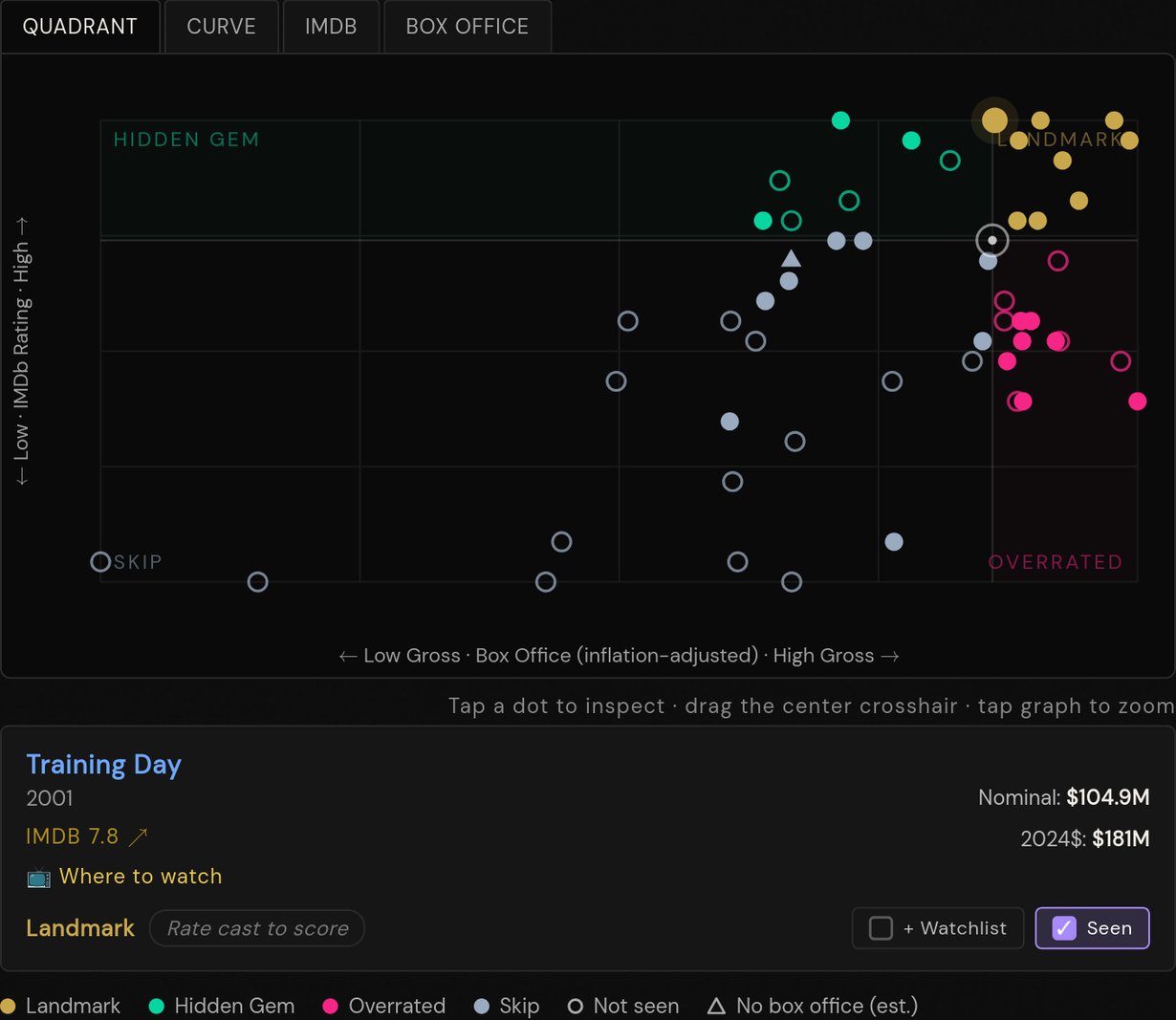
Out of the box, Training Day shows up as a Hidden Gem — meaning the graph thinks it underperformed for its quality. But Training Day is one of Denzel's landmark films. I want it in gold. So I use the Box Office Line slider to drag the vertical line leftward until Training Day flips to Landmark.
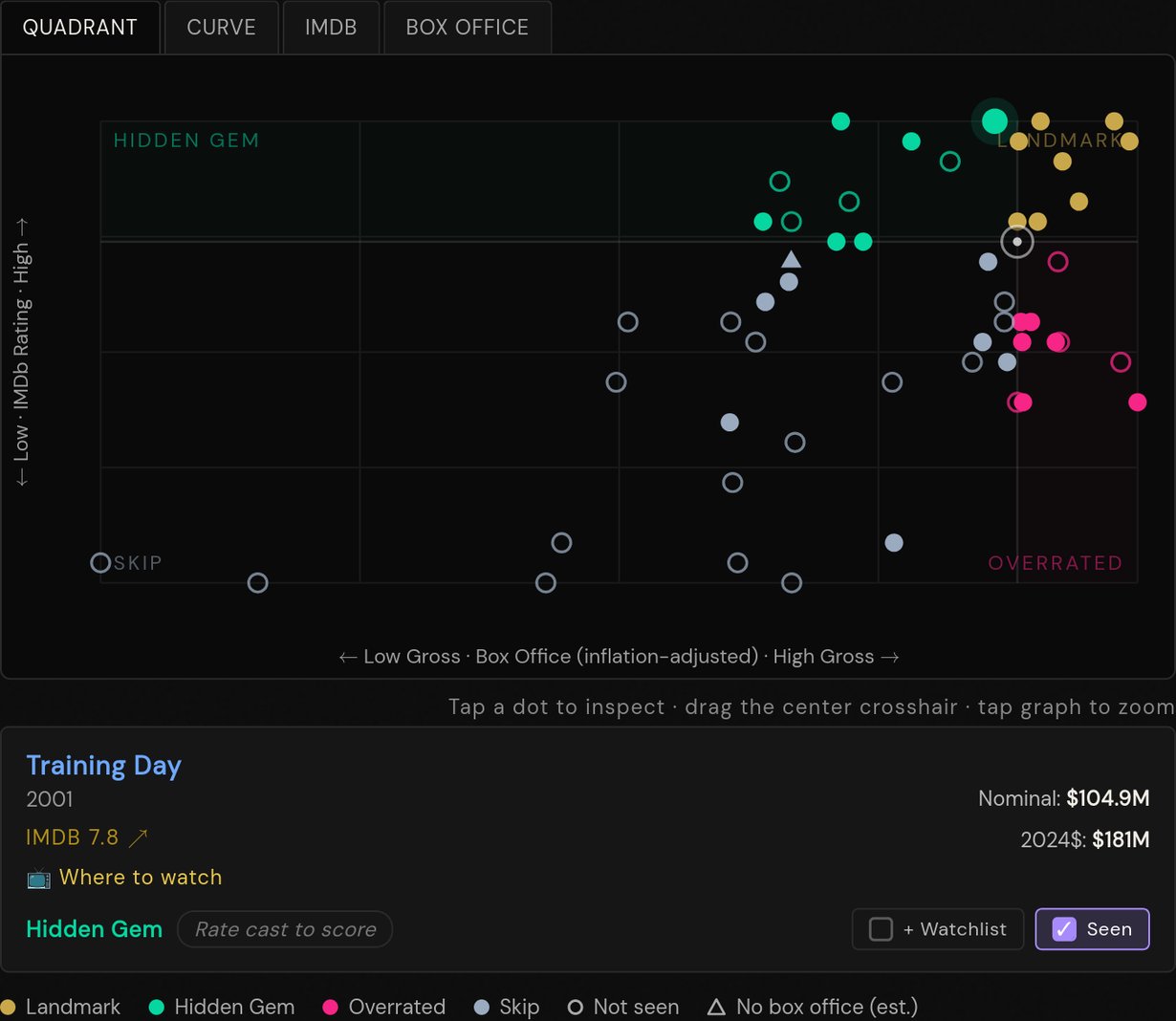
Training Day showing as Hidden Gem by default

Default — Training Day is Hidden Gem

Training Day now showing as Landmark after moving the Box Office line

After sliding BO line left — now Landmark

The IMDb line

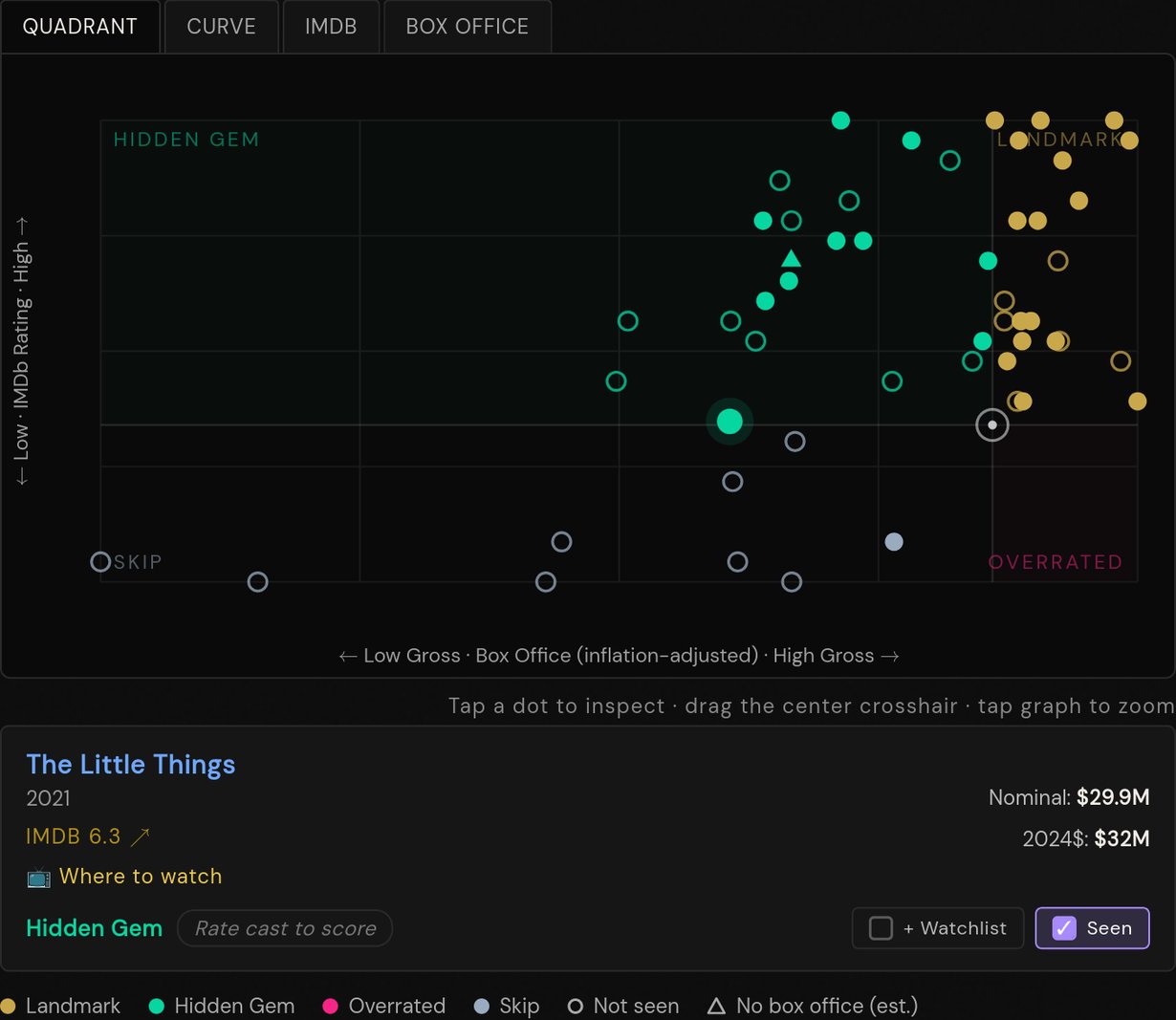
Now move the IMDb Line slider. Set it at the lowest-rated movie you personally still enjoy — that becomes your floor. Everything below it is a Skip, everything above is fair game. For me that's The Little Things (6.4 on IMDb). It starts out as a Skip; after I move the line down to meet it, it flips to Hidden Gem.
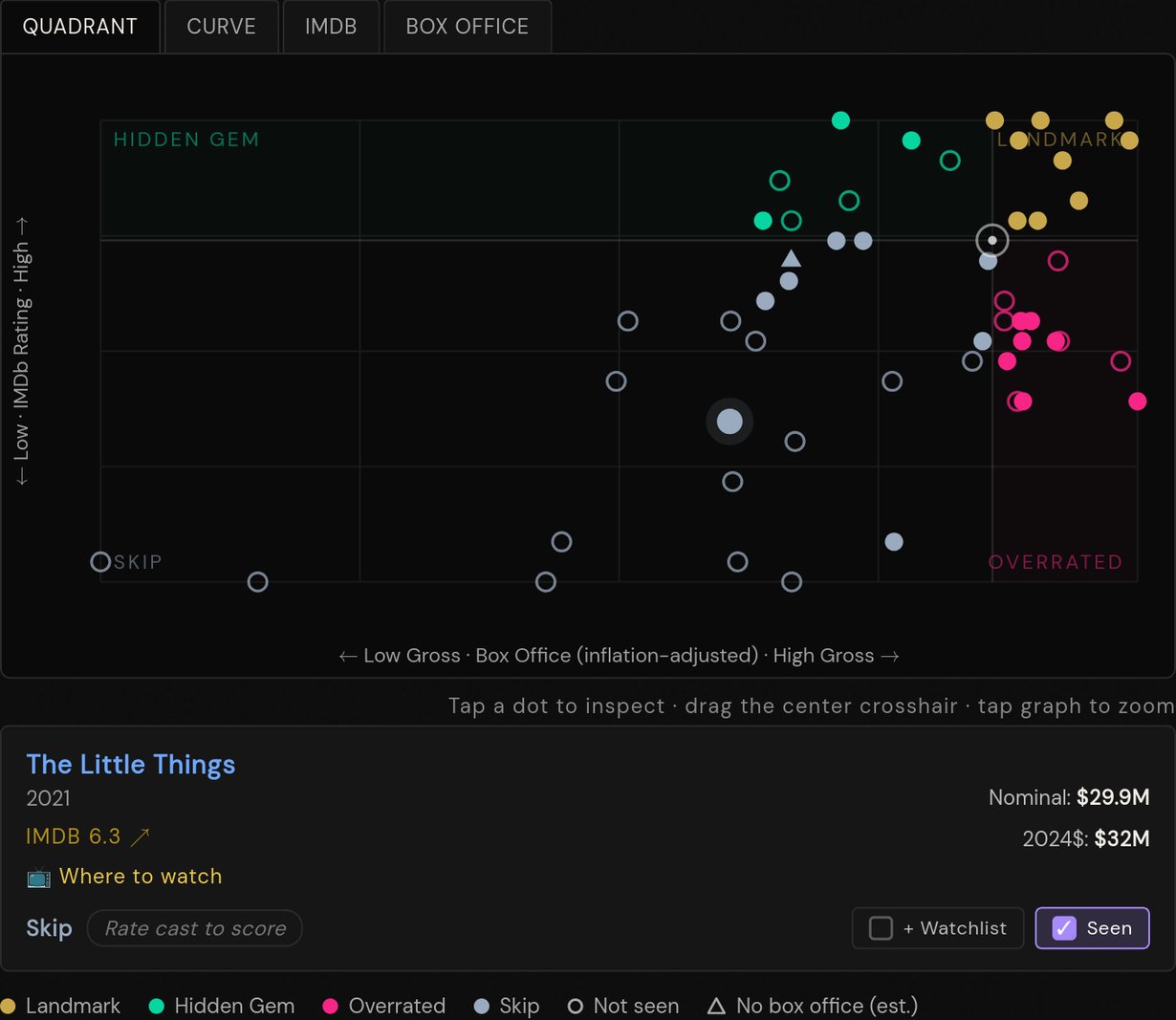
The Little Things showing as Skip before IMDb line adjustment

Before — The Little Things is a Skip

The Little Things now showing as Hidden Gem after IMDb line adjustment

After — now Hidden Gem

5

Now explore — specifically the films you haven't seen

Tap the dots to inspect movies. Tap empty space to zoom in. The empty (hollow) dots are films you haven't seen yet — those are your watchlist waiting to happen. Solid filled dots are films you've already marked as seen.

6

Read the quadrants

Landmark Hidden Gem Overrated Skip

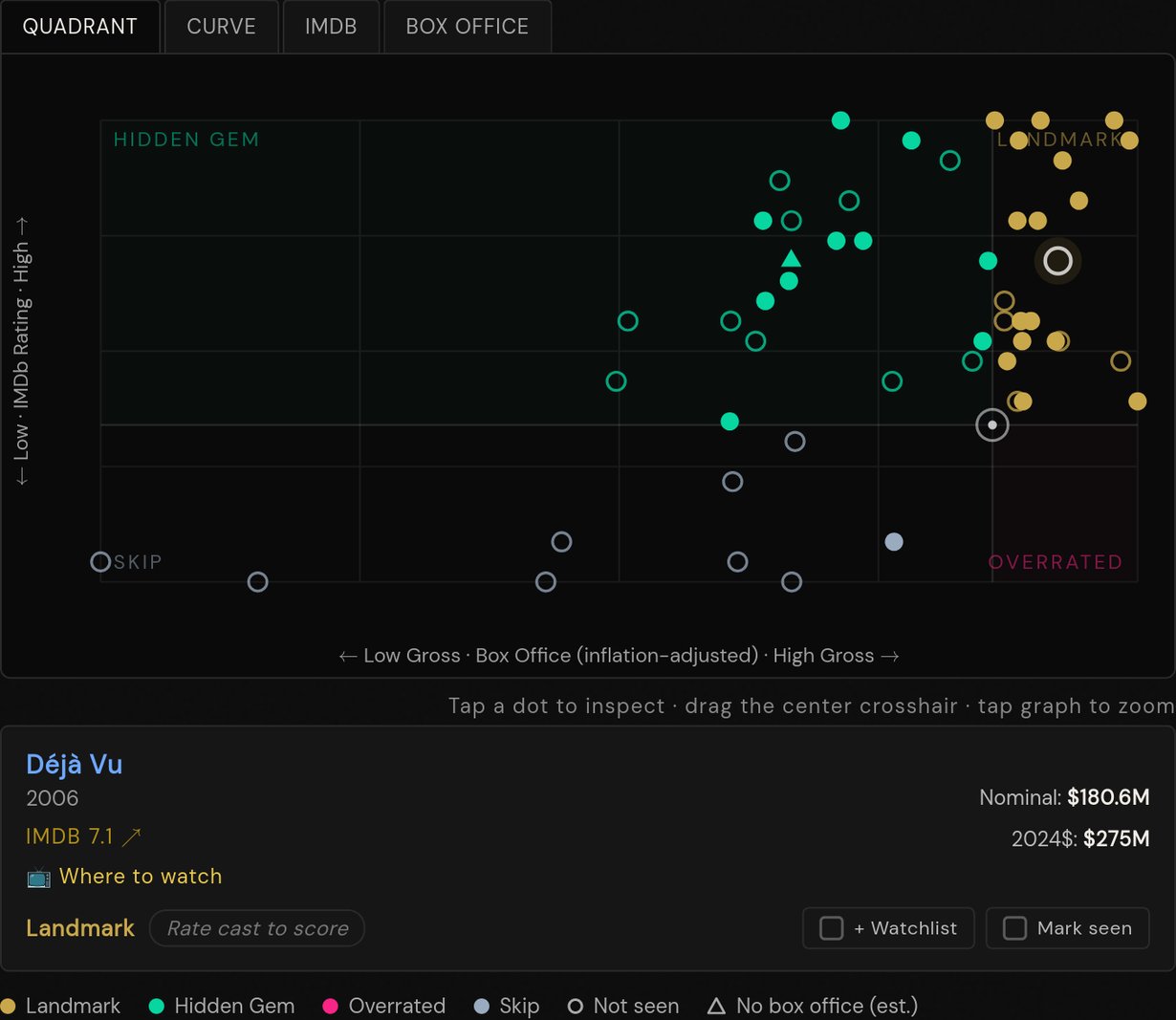
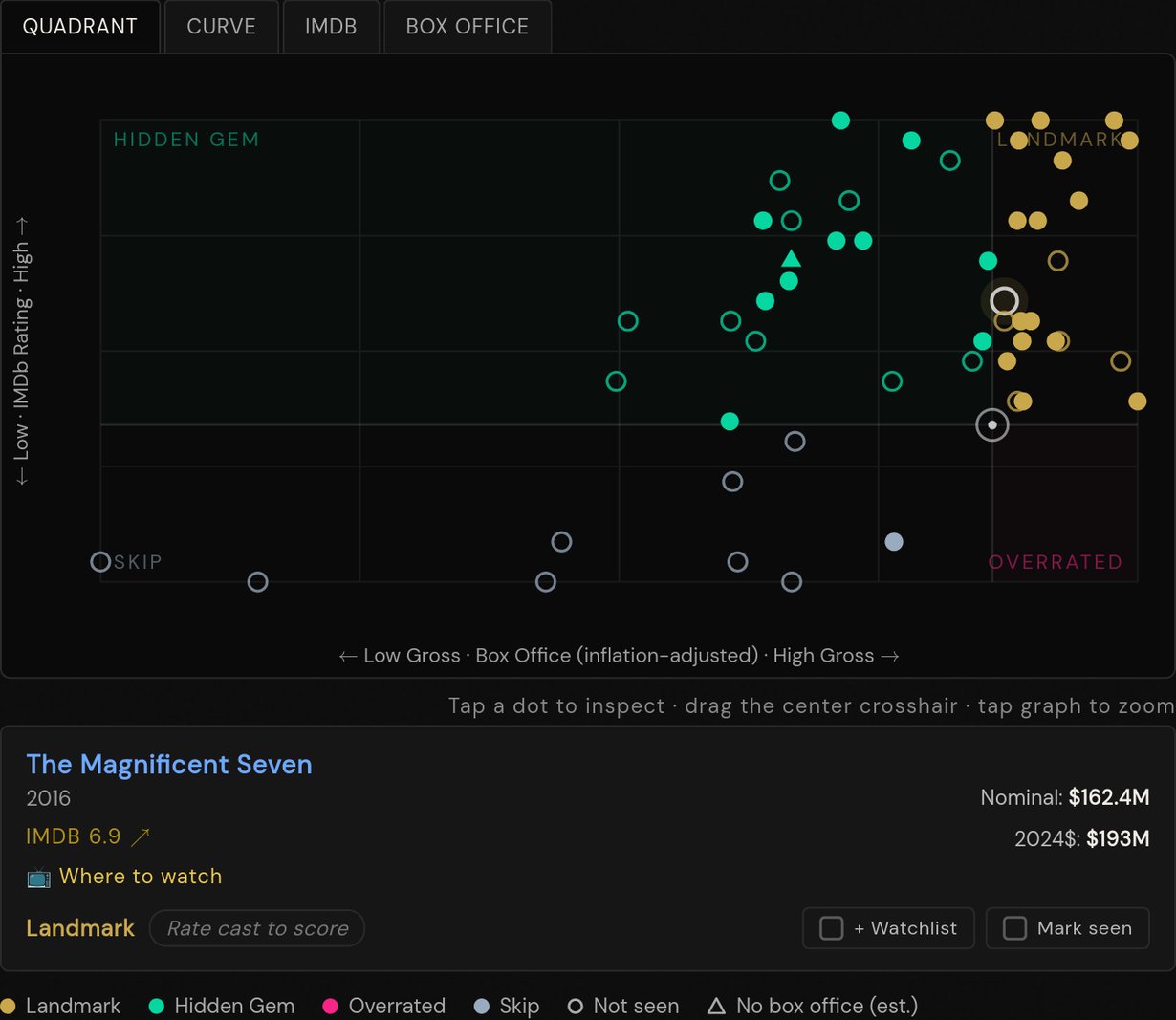
Landmark unseen = must watch. High rated, big box office, and you haven't seen it — these are the ones you owe yourself. In my Denzel example that's The Pelican Brief, Déjà Vu, and The Magnificent Seven.
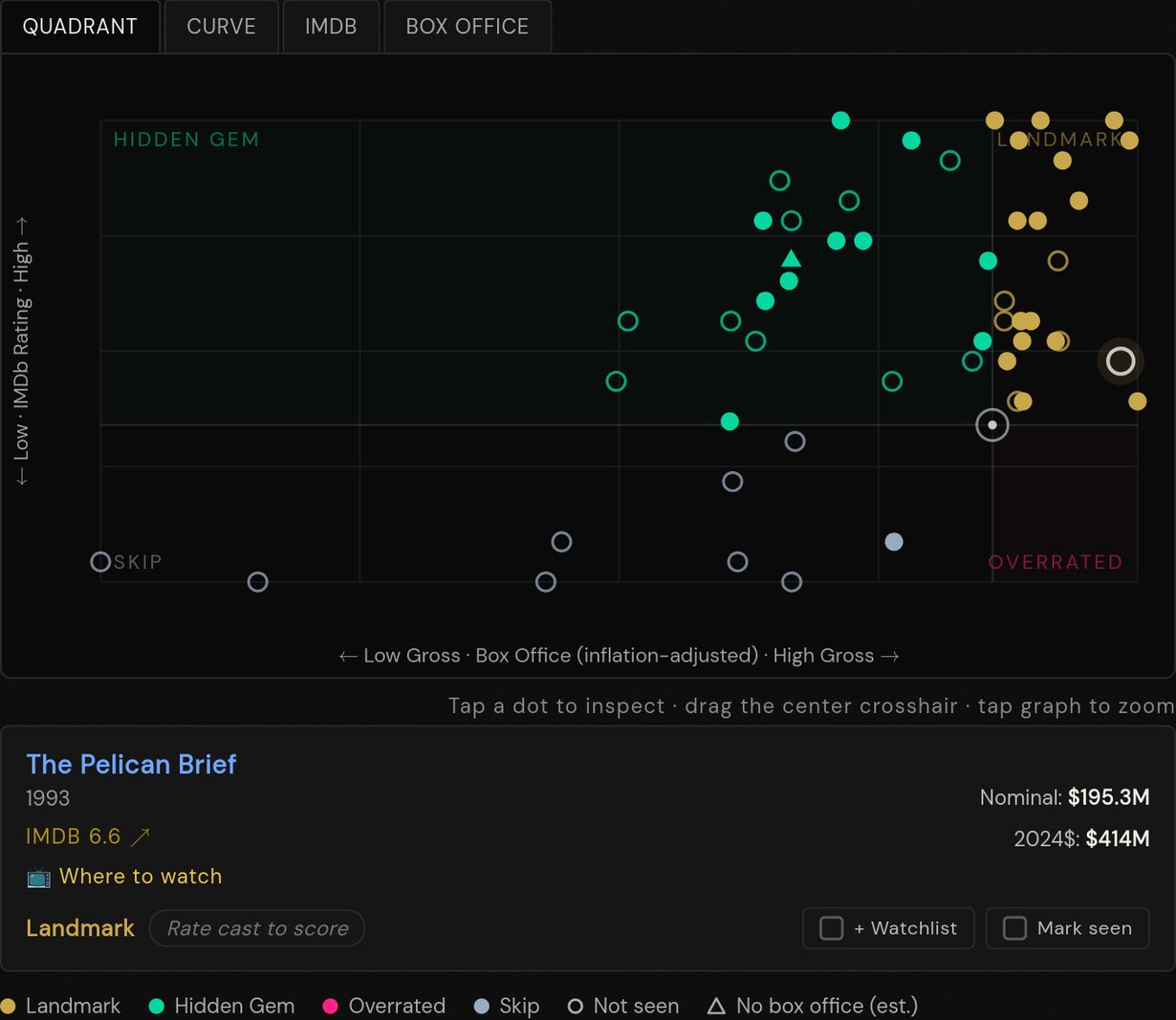
The Pelican Brief highlighted as unseen Landmark

The Pelican Brief · 1993

Déjà Vu highlighted as unseen Landmark

Déjà Vu · 2006

The Magnificent Seven highlighted as unseen Landmark

The Magnificent Seven · 2016

Hidden Gems are where you find the stuff you missed — good movies that flew under the radar commercially. Worth digging into.

Overrated might still be worth watching if you love the person, or just because some of these are so culturally everywhere that you kind of have to. (Notice that none of Denzel's films are Overrated in my setup — because he is the man.)

Skip is probably safely skippable. Even the best actors and directors make the occasional stinker, often for reasons outside their control.

7

Now go out there and explore

Pick a filmmaker or actor you love — or one you've always been curious about — and start working through their filmography. There are films in here waiting to become new favorites, and every one you check off sharpens your recommendations across the rest of the site.

The Other Chart Tabs

The Quadrant is the tracker's first tab. Three more sit alongside it — each a different lens on the same filmography.

Chart Tab 2

Curve — Graded on a Curve

Each film is graded against this filmmaker's own track record. A regression curve fits the relationship between commercial performance and critical reception across their whole filmography. Films are then judged relative to where that curve would put them:
Underrated — rated more highly than their commercial performance would predict Fair — right where you'd expect Overrated — made more than its quality seems to warrant
A film marked Underrated didn't find the commercial audience that their better-reviewed work usually does — it punched above its weight critically. Overrated means the opposite: it sold well by their standards, but audiences weren't as enthusiastic as the box office might suggest. Because the curve is calibrated to each filmmaker individually, verdicts are relative — a film that would be Overrated in Nolan's filmography might be perfectly Fair in someone else's.
The Line Offset and Fair Band Width sliders let you widen or shift the fair zone. Calibrate to anchors the curve to a specific film you consider fairly rated.
Chart Tab 3

IMDb Over Time

Plots each film's IMDb rating by year of release. A trend line shows whether critical reception improved or declined over the course of a career. Useful for spotting creative peaks and late-career reinventions.
Chart Tab 4

Box Office Over Time

Plots inflation-adjusted box office by year. All grosses are converted to 2024 dollars using CPI data, so you're comparing real commercial impact — not just raw numbers inflated by decades of ticket price increases.

Tracker Controls

Filter buttons (All / Seen / Unseen)

Filters both the chart dots and the film list at the same time. Seen shows only films you've marked; Unseen shows your watchlist. The filter applies across all chart tabs.

Sort (Year / Alpha / IMDb / Gross / Verdict)

Reorders the film list below the charts. Verdict sorts by the active chart's verdict — useful for finding the most underrated films at a glance.

Calibrate to [film]

Only films you've marked as seen appear in this menu. In the Curve tab, pick a film you think is fairly rated — the curve shifts so that film lands exactly in the fair zone. In the Quadrant tab, the crosshair moves to that film's position. Both are ways to personalize the view to your own taste rather than trusting the raw average.

Export / Import

Export saves your seen list as a small JSON snippet you can copy; Import pastes it back. If you're signed in, sync already covers switching devices — but Export is still handy for keeping a backup or sharing a watch history with someone else.

Tapping dots on mobile

Tap anywhere on the chart to select the nearest dot. If several films are clustered together, tap again in the same area to cycle through them one by one. The tooltip is where the action is: Seen and + Watchlist buttons plus an IMDb link, no scrolling to the checklist required. Tap empty space to deselect.

Filled dots vs. hollow dots — and triangles

Filled markers are films you've seen; hollow (outlined) ones are films you haven't — your blind spots. Circles are theatrical releases; triangles are direct-to-streaming films. A triangle never had a theatrical box office, so its horizontal position is estimated from how many IMDb votes it's drawn relative to the person's theatrical films — treat it as approximate; its height (the rating) is real. Everything is visible at once; the filter buttons can isolate seen/unseen.

Accounts & Syncing

You can use the entire site without an account — every rating, watchlist entry, and seen mark is saved right in your browser. But that history lives on one device, in one browser. Sign in (top-right — Continue with Google, or have a one-time sign-in link emailed to you) to sync your ratings, watchlist, seen list, and favorites to the cloud and pick them up anywhere.
Signing in never throws anything away: whatever you did anonymously is merged with whatever's already on your account. Until you sign in, browsing stays on the device you're using.
Everything stays private by default. If you claim a handle in Settings, a visibility setting decides what your followers — or anyone with your link — can see: your stats, seen films, taste, watchlist and streaming services. Your “Not interested” list and tracker calibration are never shared.

Frequently Asked

What am I rating a person on, exactly?

How much their presence draws you to a movie. It's not "are they objectively good" — it's "would I watch something because they're in it?" The slider shows up wherever the person does: on movie pages, in the web's person panel, and at the top of their tracker. It's one site-wide rating per person, however you set it.

How is a film's Movie Score calculated?

From your ratings of its tracked cast and crew — the more of your rated people in a film, and the higher you rate them, the higher it scores. The radar on each card shows who's contributing. A film with none of your rated people scores nothing: the site only knows your taste through the ratings you give.

Is my data saved between visits?

Yes. Anonymously, it's stored in your browser — so clearing your browser data will lose it, and it won't follow you to another device. Sign in (top-right) to sync everything to the cloud and keep it across devices and browsers. You can also use a tracker's Export button to copy out a backup.

Do you track me?

Only with privacy-friendly, cookie-free analytics (Umami) so I can see which pages and features get used. There are no cookies, no advertising, and no cross-site tracking — and nothing that identifies you personally.

Why are box office numbers adjusted for inflation?

A $100M film in 1990 was a much bigger deal than a $100M film in 2024. Adjusting everything to 2024 dollars using CPI data puts films from different eras on a fair footing, so you can actually compare commercial impact across decades.

What does R² mean on the chart?

R² (R-squared) measures how well the trendline fits the data — in other words, how strongly IMDb rating and box office are correlated for this particular filmography. A high R² means the two track closely together; a low one means critical reception and commercial success are largely independent.

Why is [film] missing?

Each tracker covers major theatrical releases. Short films, TV movies, cameos, and very limited releases are generally excluded. If something feels like a significant omission, email filmography.tracker@gmail.com.

Can I suggest someone to add?

Yes — email filmography.tracker@gmail.com with your suggestion. Actors and directors both welcome.
The Origin Story

It started with License to Wed. Not a critical darling, not a film anyone puts on a best-of list — but watching it was a genuine pleasure. And it led to a question: what other Robin Williams films have I never seen?

Robin Williams made 36 major films. Most people have seen the obvious ones — Good Will Hunting, Mrs. Doubtfire, Dead Poets Society. But scattered across his filmography are films that got lost in the noise: underseen, underrated, or simply forgotten.

There's also something uniquely meaningful about working through the filmography of an actor who has passed away. Their body of work is complete. Finite. Every film you haven't seen yet is a gift still waiting — a new encounter with someone whose work you love, even though they're gone.

Working through a complete filmography turns out to be one of the best ways to find films you'd love but never knew existed. This app is built around that feeling.